
A pre-chargeback alert lands at 16:40 on a Friday. It is a CDRN alert on a €142.00 payment, reason "Unrecognized". The merchant has until Monday afternoon to refund. Nobody on the team works the weekend. On Monday at 9:00, the alert is one of thirty in a list sorted by date received, and it sits on page two.
Whether that alert becomes a chargeback has nothing to do with the dispute itself. It depends on whether anyone could see, at a glance, how much time was left. NORBr now shows the time left before the response deadline on every alert that waits for a human, in hours and minutes, with colors that change as the deadline gets close and views that put the urgent ones first.
Here is a reminder of the two kinds of pre-chargeback alert, why only one of them needs a clock, and how the countdown works on NORBr for PayFacs, PSPs, ISOs and ISVs.
What are the two types of pre-chargeback alert?
There are two ways to resolve a claim before it becomes a chargeback, and they behave very differently. One refunds itself. The other waits for you.
Visa's Rapid Dispute Resolution (RDR) resolves Visa disputes automatically with a customizable decision engine. The merchant sets its rules once. When a claim matches a rule, the network applies the refund itself, and the alert arrives already resolved. There is no deadline to watch, because there is nothing left to do.
CDRN from Verifi and Ethoca alerts from Mastercard work the other way. The alert goes to the merchant's team, and the team decides whether to refund. Visa describes CDRN as giving merchants 72 hours to initiate a cardholder credit before a chargeback is filed, and Ethoca alerts let a merchant stop fulfillment or process a refund, eliminating the need for a chargeback. These are the alerts that need a clock: the refund is a human decision, and the window is counted in hours, not weeks.
Why does the deadline matter more than the date received?
Because alerts do not arrive in the order they expire. Two alerts received on the same morning can carry different response windows depending on their source. An alert received on Friday afternoon and one received on Monday morning can both be due on Monday. A list sorted by date received hides exactly the alerts that are about to turn into chargebacks.
Missing the window is not a small miss. Disputes resolved before they become chargebacks are excluded from the VAMP ratio, and Visa's program rates a merchant Excessive at a 1.5% ratio of fraud and disputes since April 2026 in Europe, the US, Canada and Asia Pacific. An alert refunded one hour late is a chargeback on time, with its fee, its paperwork and its weight in the ratio your acquirer is monitoring.
How does the countdown work on NORBr?
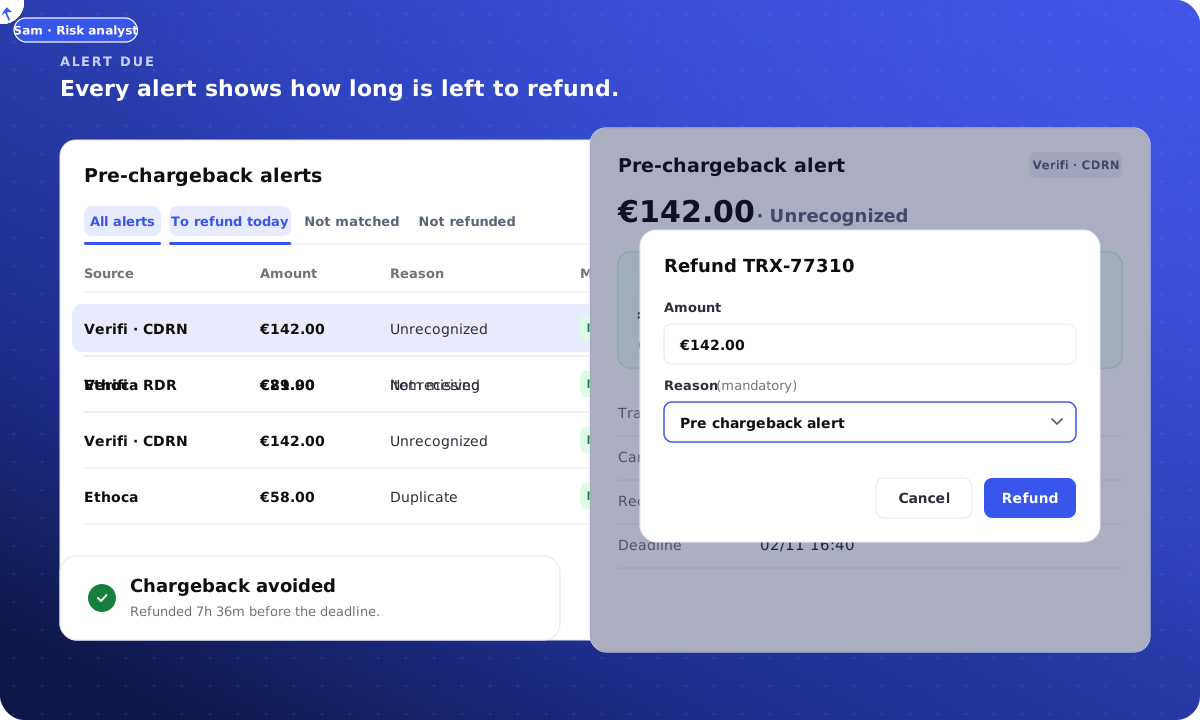
Every alert that waits for a refund shows the time left before its response deadline, in hours and minutes, in the pre-chargeback alerts table and at the top of the alert itself. The time is counted from the deadline set by the alert, not from when someone opened it, and it reads the same for a team in Amsterdam and a merchant in São Paulo.
The color tells you how urgent it is before you read the number. Under 12 hours left, the time shows in red. Above 12 hours, amber. Once the deadline has passed, the alert says expired, with a plain warning: a chargeback can follow.
RDR alerts do not count down. They show network refund instead, because Visa has already issued the refund and nobody needs to act.
What does the banner on an alert say?
The banner above the alert's details changes with what is left to do. When the alert is not yet matched to its transaction, it reads time left to respond, with the instruction match the transaction, then refund, and a button that opens the list of candidate payments. Matching by hand is explained in our article on manual matching.
When the alert is matched but not refunded, the banner reads time left to refund, with a link to the transaction. Under 12 hours, it adds refund now to avoid the chargeback. The banner also shows the exact deadline and the alert's source, Verifi or Ethoca.
When the refund is done, the banner disappears. A refund card replaces it, with the refund status, the reason, the amount, the date and the name of the person who refunded.
How do you find the alerts due today?
Saved views do the sorting for you. "To refund today" lists the alerts whose deadline falls before the end of the day and that have not been refunded. "Not matched" lists the alerts still waiting for their transaction. "Not refunded" lists every alert whose money has not gone back yet, whatever the deadline. And sorting any view on time left puts the most urgent alert first.
A team that starts its morning on "To refund today" does not need to know which network sent which alert, or what window each one carries. It needs to work down a list that is already in the right order.
How is a manual refund recorded?
From the alert, one click opens the transaction. The Refund button asks for a reason, and the reason is mandatory, with "Pre chargeback alert" already selected. The refund is issued on the original payment, through the partner that processed it.
The record then exists in both places. On the transaction, the refund and refund reason columns show the payment was refunded because of a pre-chargeback alert. On the alert, the refund card shows who refunded and when. Whoever looks at either side later, a support agent, a risk analyst, an auditor, sees the same answer without asking the person who clicked. The full matching logic that makes this possible is covered in our article on automatic transaction matching.
What should an operator check in its own alert handling?
Three questions. Can your team see, on every alert, how many hours are left, without opening it? Can it list, in one click, everything due before tonight? And when a refund is issued, does the payment record say it was issued because of an alert? If any answer is no, some of your merchants' chargebacks were refunds that arrived too late.
The Friday alert on €142.00 opens on Monday at 9:00 at the top of "To refund today", in red, with 7 hours and 40 minutes left. It is refunded at 9:04.
What else do operators ask about pre-chargeback alert deadlines?
How long does a merchant have to answer a CDRN alert?
Visa describes CDRN as giving merchants 72 hours to initiate a cardholder credit before a chargeback is filed. Ethoca alerts have their own windows. The countdown on each alert is calculated from the deadline the alert carries, not from the moment someone opens it.
Why do RDR alerts have no countdown?
Because Visa resolves them itself. The merchant's rules decide which claims are accepted, and when a claim matches, the network applies the refund. The alert arrives already resolved and shows a network refund, so there is nothing left to do before a deadline.
What happens when the deadline passes?
The alert shows as expired, with a warning that a chargeback can follow. The claim may then reach the merchant as a chargeback, with its fee and its weight in the dispute ratio monitored by Visa and Mastercard.
How does a team see what is due today?
The "To refund today" view lists the alerts whose deadline falls before the end of the day and that have not been refunded. Sorting any view on time left puts the most urgent alert first, whatever the network or the date received.
NORBr Pre-chargeback Alerts gives PayFacs, PSPs, ISOs and ISVs Verifi and Ethoca alerts with the time left on every alert, automatic refunds for RDR and a clear deadline for everything else, under their own brand. Talk to us about resolving your merchants' claims before they become chargebacks.